
TL;DR: We're introducing the UHK rubber palm rest, now available in our webshop.
Since the beginning, we've been offering the UHK wooden palm rest that many of you love. However, we've consistently heard requests for an alternative, so we've been working on a new option recently.

The rubber palm rest matches the wooden one in size and shape. Its durability is on par, too, thanks to the rubber being fixed to a powder-coated steel plate that connects to the UHK.
We use EPDM rubber of Shore 60 hardness. It has a slightly grainy surface and a decent grip. Internally, the rubber has a cell structure that remains firm under pressure.

The rubber palm rest has more of an industrial look than the wooden palm rest. We opted for all-black, so if you're a secret agent on a mission and want to stay undercover, look no further. We don't plan to offer additional palm rest colors.
As for compatibility, the rubber palm rest is compatible with both the UHK 60 v1 and v2, so you're covered regardless of your UHK version.
Thanks for reading this update. Talk to you later!
TL;DR: Update to the newest Agent and set the backlighting of keys to your heart's desire!
The UHK 60 v2 has been supporting functional backlighting from the get-go, which is loosely speaking per-key backlighting, but functional backlighting colors are tied to the configuration of keys, so it hasn't been possible to set colors independently of key mappings until now.
Let's see how to use Agent's new and shiny (pun clearly intended) per-key backlighting feature.
First, update to the newest Agent and let it update your firmware.
Next up, navigate to the new "LED settings" page.

In the "Functional backlighting colors" section, you can adjust the eight functional backlighting colors if you want to stick to functional backlighting.
The newly added "LED fade timeout" option disables the LEDs after the specified idle interval. (This option has been available as a smart macro variable).
If you want to finally switch to per-key backlighting, choose the "Per-key backlighting" option in the "Backlighting mode" section of the page and check out one of your keymaps.

As you can see, there's a color palette on the top of the page, and by default, all keys are white. Now let's pick a color and start painting.
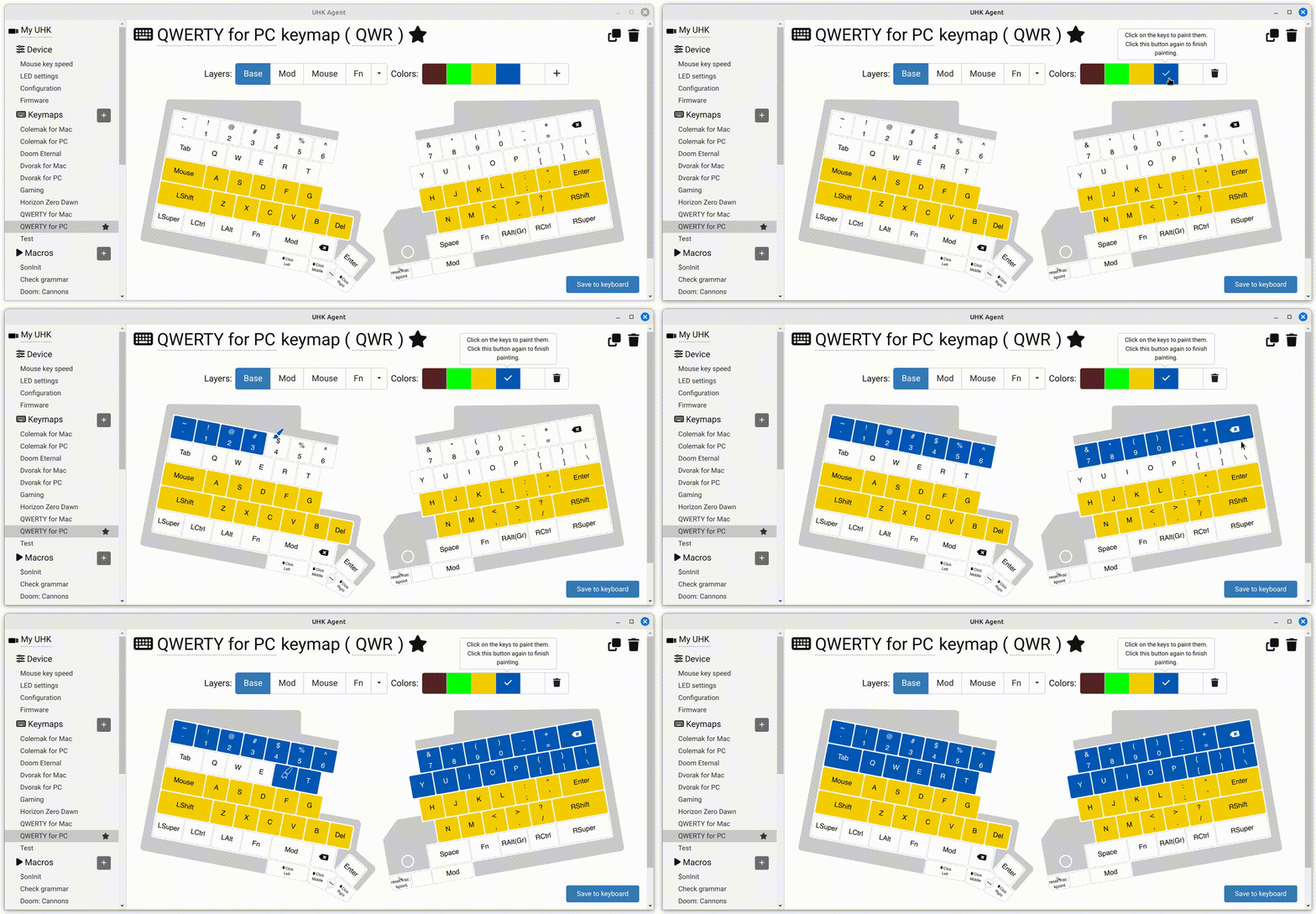
When hitting the "Save to keyboard" button, the colors will be updated on your UHK. Key colors are saved per keymap and per layer.
You can easily add new colors, adjust existing colors, and remove any colors. Just hover over the palette, and read the instructions in the tooltips.
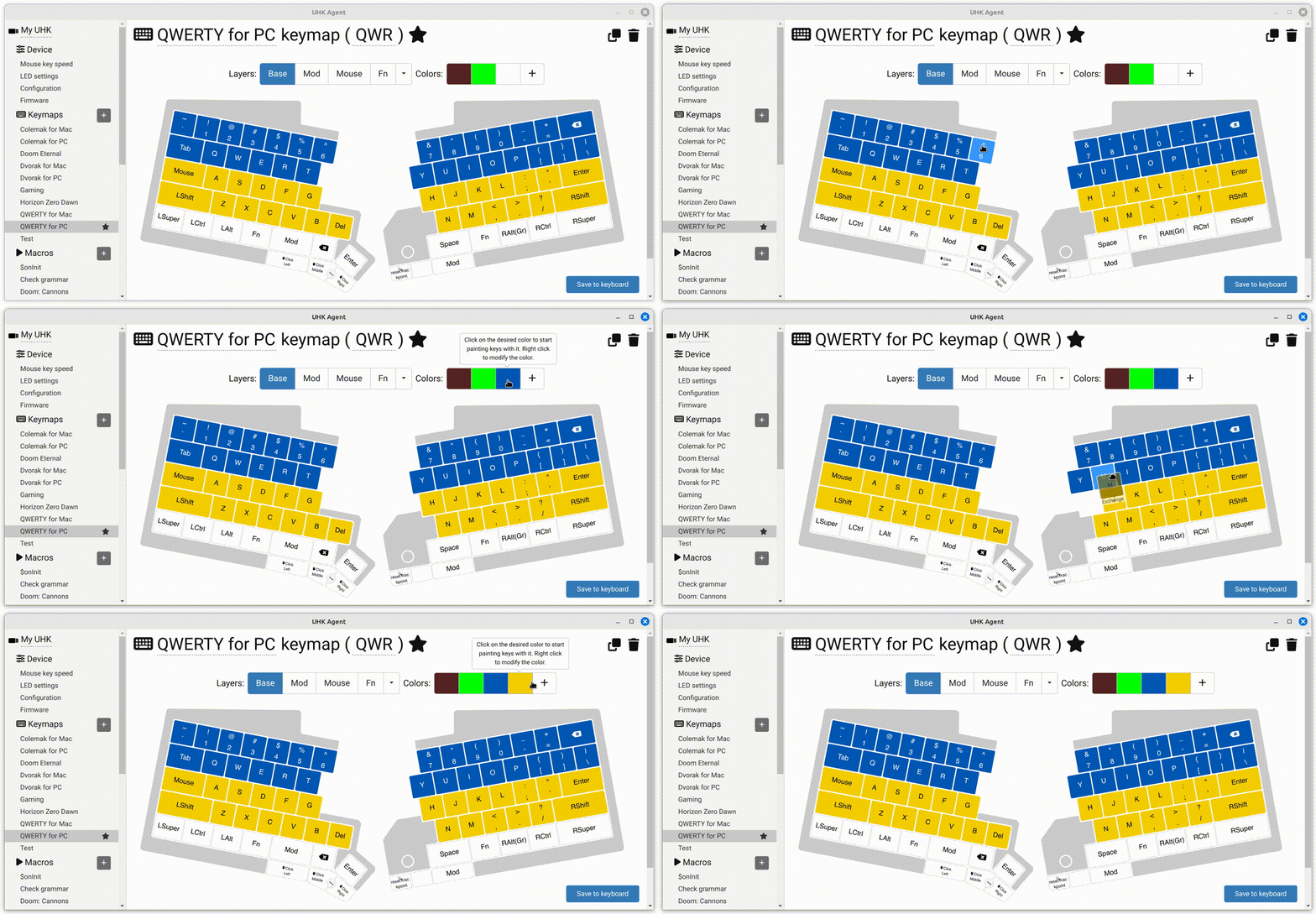
When the paint mode is inactive (none of the colors are checked), you can drag key colors to the palette to overwrite existing palette colors or add new colors.
Talk to you later!
TL;DR: We've just released the UHK 60 v1 backlight upgrade kit, containing keycaps, LEDs, and a keycap puller. Soldering is needed to install the LEDs.

Ages ago, we promised to release the backlight upgrade kit for the UHK 60 v1. In the meantime, we've been busy releasing the modules, the UHK 60 v2, and catching up with production amid Covid and the chip shortage. But now that we've caught up, it's time to release the kit, so let's discuss the details.
On the bright side, pun clearly intended, the sides of the keycaps are also lit, not just their top side. As a matter of fact, the backlighting of the sides is more consistent than the top sides.
On the flip side, these keycaps are laser-etched ABS keycaps that may last years but won't last forever, and the black paint may wear off eventually. We plan only to use PBT keycaps going forward, but this kit is such a niche product, even for us, that it didn't make financial sense to pay for the tooling of custom PBT keycaps. (The UHK 60 v2 PBT keycaps are not recommended to be used with this kit because UHK 60 v1 LEDs are located at the bottom of the keycaps versus the UHK 60 v2 LEDs, which are located at the top.)
The kit contains keycaps for both ANSI and ISO UHKs, and it doesn't contain Mac and Windows keys, only Super keys.
The UHK 60 v1 only supports single-color backlighting. Namely, we provide white LEDs, and you have to solder them. Soldering is quite time-consuming, so we don't offer a soldering service but provide installation instructions.
Thank you for reading this short announcement. We hope we put a smile on the faces of some UHK 60 v1 owners. Talk to you later!
Hallo, hallå, and hei! We're excited to introduce new PBT keycaps, including:
Let me emphasize that these are not cheap ABS but durable PBT keycaps. PBT keycaps featuring non-English symbols are rare, and we've paid dearly for their tooling to bring them to life. These keycaps are backlit-friendly, the same type that the UHK 60 v2 has. The legends are easy to read even when they’re not backlit. The surface of these keycaps never gets shiny with use, and their legends never fade.
You can purchase the German, Nordic, and Plain keycap sets as part of your new UHK or as a separate keycap set.
The OS keycaps are only available as a separate product. We won't make them available as a product option for the UHK because we already offer too many product options, which makes manufacturing slow and error-prone.
Let's see some photos of the new keycaps in their full glory.


We haven't forgotten about the UHK 60 v1 backlight upgrade kit that we promised ages ago, and we'll announce it in a separate update.
Lastly, I'm delighted to say that we've caught up with pending orders, and new orders will ship in a week.
Talk to you soon!
Let's say you want to map Ctrl+C to Shift+1.
First up, add the Shift layer to your keymap:

On the Shift layer, map the 1 key to Ctrl+C:

The modifier layer (in this example, the Shift layer) automatically becomes active when you press the relevant modifier key. If a key on the modifier layer is unmapped, the UHK will fall back to the base layer and compose its mapping with the modifier.
You're probably already done, but there's one more thing. By default, modifier layers can be activated by both left and right modifiers. If you want to use only the left or right modifier to activate a modifier layer, you can change the modifier layer triggers via smart macros:

You're done!
Update 2023-08-19: Now the "LED settings" page contains the "LED fade timeout" setting, so you don't have to use smart macros to use it.
Some of you want your UHK to automatically turn off its LEDs after some idle time, which can be configured by setting the leds.fadeTimeout smart macro variable in the $onInit macro as follows.

You can learn more about smart macros.
We realize that this setting is not as accessible as it should be, and we'll make it easier to adjust it in later Agent versions.